Key takeaways
- Describe the wedding to Claude in plain words and ask for a one-page invitation built for phones.
- Check every name, date and address, then refine one change at a time until every button works.
- Publish it, add a preview image and a short link, and share that one link on WhatsApp.
You can make a digital wedding invitation with Claude without a designer or any coding. Describe the wedding in plain words, ask for a one-page invitation that works on a phone, check every detail and refine it in small steps. Then put it online and share one link on WhatsApp.
Recently I was asked to make a wedding invitation. Instead of opening a design tool, I built it with Claude, hosted it on this website and gave the family one short link to send to their guests. This guide shows how you can do the same, and when it is still worth paying a professional.
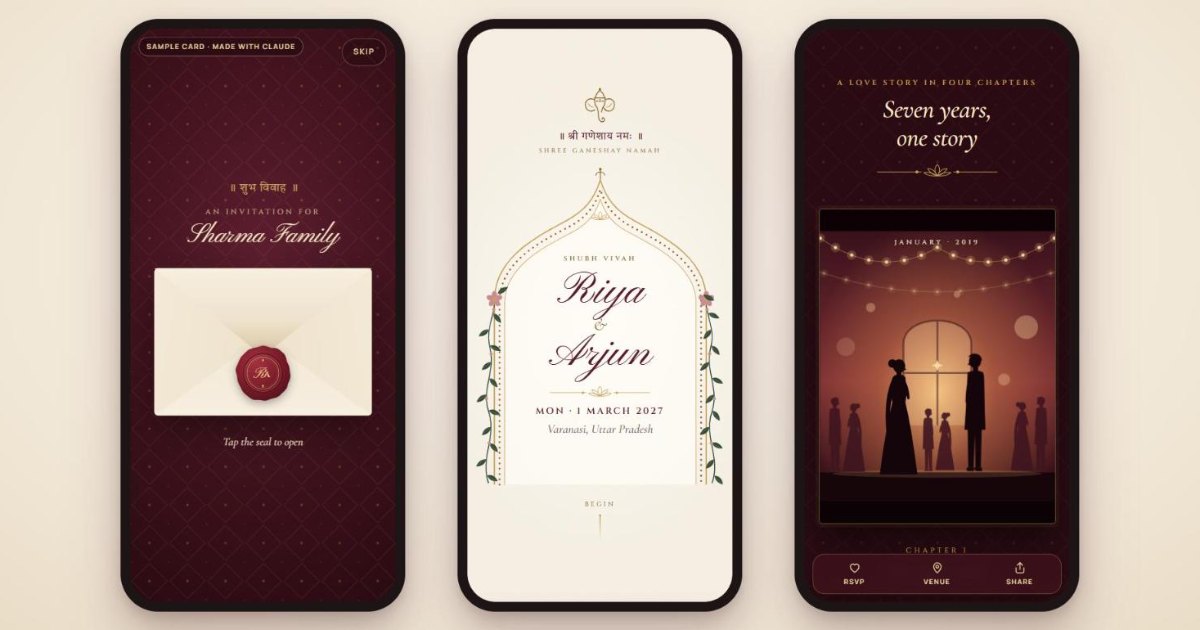
The family’s real card stays private. The sample below is a copy of the same card with made-up names and places, so you can see exactly what Claude can build.
What a Claude-made wedding invitation can do
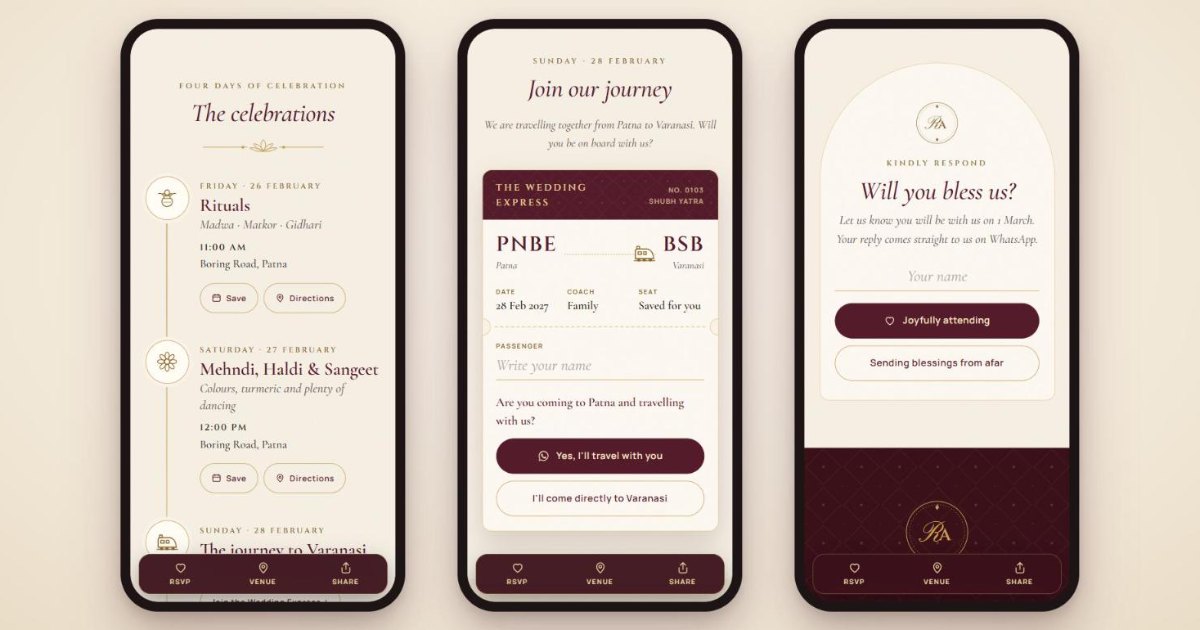
This is not a flat image. It is a small web page that opens in any phone browser, including inside WhatsApp. Here is what the card I made includes:
- A sealed envelope that opens when the guest taps the wax seal.
- A personal greeting. Add
?to=Sharma%20Familyto the end of the link, and the envelope says “An invitation for Sharma Family”. - Hindi and English together, from “॥ श्री गणेशाय नमः ॥” at the top to the couple’s names under a temple arch.
- A live countdown to the wedding.
- The couple’s story in four short chapters, each with its own illustrated scene.
- Every function with a Save button for the guest’s calendar and a Directions button that opens Google Maps.
- A train-ticket style travel RSVP for guests joining the family’s journey to the wedding city.
- An RSVP that opens WhatsApp with the guest’s reply already written.
- A share button and a copyable hashtag.
Open the live sample invitation on your phone and tap through it. It takes less than a minute, and it shows more than any description.
What you need before you start
You need a Claude account and the wedding details. Claude builds interactive pages as artifacts, which open in a panel beside the chat. Anthropic’s help page on what artifacts are says they are available on the Free plan and on paid plans. It lists single-page websites among the things Claude can make. Artifacts need the “Create and edit files” setting, which you turn on under Settings, then Capabilities.
Collect these details in one note before you open Claude. Most mistakes in a wedding card come from details typed in a hurry.
- Names of the bride and groom, and of the parents who are inviting.
- The date, day and start time of every function, with the full address of each venue.
- The WhatsApp number that should receive replies, with the country code.
- The style you want: colours, mood, traditional or modern, and any lines in Hindi or another language.
- Optional extras: a short love story, a hashtag, travel plans or a dress code.
Anyone with the link will see everything on the card. Before you add a home address, ask whether the venue address alone would do.
Step by step: build the invitation in Claude
The work happens in four steps: one detailed request, a careful check, small fixes and a final test.
1. Start with one detailed request
Your first message sets the quality of everything that follows. Give Claude the details, the style and the features in one go. You can copy this prompt and fill in the brackets:
Create a digital wedding invitation as a single, self-contained HTML file.
It must look beautiful on a phone first, and open well inside WhatsApp's browser.

Couple: [Bride's name] and [Groom's name]
Invited by: [Parents' names]
Style: [e.g. traditional Indian, burgundy and gold, elegant]
Languages: English, with [e.g. "॥ शुभ विवाह ॥"] in Hindi

Functions (name, date, time, full venue address):
1. [Haldi - Friday, 26 February 2027 - 11:00 AM - full address]
2. [Wedding - Monday, 1 March 2027 - 8:00 PM - full address]

Features:
- An envelope opening screen that opens when the guest taps the seal
- A countdown to the wedding
- Save to calendar and Google Maps directions for every function
- RSVP buttons that open WhatsApp to [91XXXXXXXXXX] with the message pre-filled
- A share button
- Show "An invitation for [name]" when the link ends with ?to=[name]

Keep all text easy to edit, and do not invent any details I have not given.
The last line matters. Ask Claude not to invent details, and then check that it kept to that.
2. Check every detail in the preview
Claude shows the result in the artifact panel. Before you change the design, read it like a guest would. Check the spelling of every name, every date against its day of the week, every time and every address.
Then tap every button. Save should create the right event at the right time. Directions should open the right place in Maps. If Hindi or another language is on the card, ask someone who reads it fluently to check the spelling.
3. Refine one change at a time
Ask for changes in short, specific messages. Small requests are easier for Claude to get right and easier for you to check. For example:
- “Make the couple’s names larger on the first screen, and keep everything else the same.”
- “Add a section with the couple’s story in four short chapters, using the text I give you.”
- “Change the RSVP so the message includes the guest’s name.”
- “Use the calendar format iPhones accept for Save buttons, and Google Calendar on other phones.”
WhatsApp has an official format for these RSVP links. Its click to chat guide says the number must be in full international format, without zeroes, brackets or dashes. For India, that means 91 followed by the ten-digit mobile number.
4. Ask Claude to check its own work, then test it yourself
Before you share anything, ask Claude: “Review this invitation for broken buttons, wrong dates, text that overflows on a small phone, and anything that would fail without internet fonts.” Then open it on two or three real phones, including one older Android phone on mobile data.
Put the invitation online and share one link
A wedding card is only useful once guests can open it from a link. Here are the simplest routes.
| Option | Cost | Good for | Watch for |
|---|---|---|---|
| Publish from Claude | Works on the Free plan | The fastest way to get a link | Test every button on the published link, not just in the preview |
| Your own website | Your existing hosting | A link on your own domain, and full control | Upload it as its own page, and stop search engines indexing it |
| Netlify Drop | No account needed to publish | Dragging a folder into the browser to get a link | Log in first, so you can manage and update it later |
| GitHub Pages | Free for public repositories | People comfortable with a GitHub account | The files sit in a public repository |
Publish straight from Claude
Anthropic’s guide to publishing and sharing artifacts says artifacts start private. On personal plans, including Free, you click Publish and copy the public link. Anyone with that link can view and use it without a Claude account. If you later click Unpublish, the link stops working and cannot be republished.
Or download the file and host it yourself
Use the controls at the top of the artifact panel to copy or download the code, and save it as index.html. I uploaded the card to its own folder on this website, so the family’s link opens on my domain. If you already pay for hosting, this is the most dependable option. My comparison of hosting and cloud providers in India explains the choices if you don’t have any yet.
No website? Netlify’s documentation describes Netlify Drop as a way to drag and drop a folder of files that “goes live instantly, no account required”. GitHub Pages is free for public repositories on GitHub Free.
Add a preview image, a short link and privacy settings
- Preview image. Ask Claude to add Open Graph tags with a preview image. WhatsApp and other apps read these tags to show a picture and a title when you paste the link. The Open Graph protocol lists the tags.
- Short link. A long link looks untidy in a family group. I used TinyURL with a custom name, then opened the short link myself to confirm it went straight to the card with no ad page in between.
- Keep it out of Google. A wedding card is for guests, not search results. Ask Claude to add a noindex robots meta tag, which tells Google not to show the page in Search.
Mistakes to avoid with an AI wedding invitation
- Trusting the first version. AI tools can get a day of the week or a time zone wrong. Check every date against a calendar.
- Calendar times in the wrong time zone. Ask Claude to set every event in Indian Standard Time, then save one event on your own phone and check the time.
- Heavy photos. Large images make the card slow on mobile data. Ask Claude to keep images small, or use drawings instead of photos.
- Testing only on a laptop. Many guests will open the card from WhatsApp on a phone. Test it there.
- Sharing private details. Anyone with the link can see the card, and links get forwarded. Leave out anything the family would not want a stranger to read.
When to hire a professional instead
For a card like the one above, you do not need to pay a designer. Some jobs still need a professional:
- Original artwork, such as hand-drawn caricatures of the couple, custom illustrations or a family crest.
- Guest management: an RSVP list that saves to a spreadsheet, meal choices, room allocation or reminders. The card above sends replies to WhatsApp and does not keep a list.
- A full wedding website with several pages, photo galleries, a custom domain and email.
- Printed cards. Print needs its own sizes, bleed and colour settings, and a designer and printer are the safer choice.
- Video invitations and anything with music, voice-over or professional animation.
The same rule applies to business websites. A tool can get you a long way, and the details decide whether the result works. My guide to hiring a web development agency in India covers what to ask when you do pay someone.
Frequently asked questions
Is Claude free to use for a wedding invitation?
Anthropic lists artifacts, which Claude uses to build pages like this, on the Free plan as well as paid plans. Free plan usage has limits, so a long design session may need a break or a paid plan.
Can the invitation be in Hindi or another Indian language?
Yes. The card I made mixes Hindi in Devanagari script with English. Tell Claude which lines should be in which language, and have someone who reads the language check every word.
Do guests need to install an app or create an account?
No. The invitation is a web page, so it opens in the phone’s browser or inside WhatsApp. For a card published from Claude, Anthropic says anyone with the link can view and use it without a Claude account.
How do guests RSVP?
The simplest way is a WhatsApp button that opens a chat with a reply already written, which the guest only has to send. If you need a full guest list with counts and meal choices, that needs a form connected to a spreadsheet or an RSVP service.
Try it for your own family’s wedding
Write down the details first, paste the prompt above into Claude, and change one thing at a time until every button works on a phone. Then publish it, add a preview image and a short link, and send it to the family group.
Want more than a single card, such as a full wedding website, custom artwork or a site for your business? My website design and development service covers that kind of custom work.